
Modernize Your Data Stack with DBT: Less Tech Debt, Faster Decisions

I’ve been working with DBT (Data Build Tool) over the past few months, and it’s become fundamental in many data processes for our clients and a straight-up industry standard.
It’s an open-source tool that, backed by database engines like Postgres DB, Databricks, Snowflake, or Redshift, lets you transform data in a flexible and efficient way. In essence, DBT makes it easy to write SQL-based transformations, but with added layers of functionality that make them more maintainable, testable, and reliable.
But First, a Personal Note
My entry into the data world started on the data science side, building machine learning models. Since I don’t come from a traditional computer science or mathematics background, early on I had to focus on a single area to sharpen my skills and land an opportunity.
Fortunately, that opportunity came, and over the years I grew enormously as a professional until I joined deployr. But there’s an inescapable reality: throughout these years, technical roles focused on ML/AI and programming changed significantly due to several factors:
- The arrival of ChatGPT and other AI tools that speed up code development,
- The emergence of frameworks that abstract much of the work that used to be done by hand,
- The rise of remote digital education,
…and many other factors that significantly lowered the barrier to entry in this industry while simultaneously making us more productive, with more time available for different tasks.
This means that in many cases the traditional data scientist role has been falling out of use and other roles have been replacing it, not necessarily in function but in scope and diversity of responsibilities. At deployr we decided to call this role “Data Developer,” and it’s the one I identify with most today: I no longer focus 100% on building a machine learning model. Instead, I participate in the entire data process end to end.
However, to be able to do this, I had to train in Data Engineering and adapt to the times. With the client I’m currently working with, after focusing on modeling and ML, it became necessary to concentrate efforts on data process efficiency and modernizing the infrastructure. And the technology chosen for this was a tool that changed my understanding of an end-to-end data process and has a name that sounds like a Dragon Ball Z sequel: DBT.
What Is DBT?
As I mentioned above, DBT is a tool that lets you write SQL-based transformations with many additional capabilities. But unlike traditional ETL (Extract, Transform, Load) tools, DBT focuses exclusively on the T.
This means DBT assumes the data is already stored in a data warehouse and provides the tools to modify and process that data within the warehouse itself into information ready to be consumed by other processes, like BI dashboards or machine learning models.
The core concept of DBT is treating data transformations as a form of software development. This brings software engineering best practices into data work, including version control, modularity, tests, documentation, and deployment management.
Why Choose DBT?
From a developer’s perspective, the ease of implementation and how structured the projects are makes DBT a very agile and productive framework.
But from a business perspective, when selecting the stack to work with (or evaluating alternatives to replace or improve what’s already in place), DBT has some strong points in its favor:
- Cost efficiency: DBT helps make efficient use of compute resources and their associated costs through query optimization, incremental models, scheduled transformations, and code reusability, among others.
- Faster development: DBT accelerates data process development cycles and subsequent analysis, which translates into faster insights to base business decisions on.
- Reduced technical debt: The structured approach to data transformation avoids messy code and undocumented processes, reducing long-term costs by preventing duplicated work or rewritten scripts.
- Improved data governance: The documentation, lineage tracking, and testing included in the framework support compliance and governance requirements.
- Scalability: The ability to grow with data teams and scale alongside the company’s needs is a major plus for DBT.
- Democratized data access: The transparency-and-documentation-first approach helps make business decisions truly data-driven.
On top of that, since it integrates with most database engines and data warehousing providers, the implementation barrier for DBT is comparatively very low. In our experience, any company thinking about modernizing its data infrastructure should at least consider it as an option.
Core Concepts
DBT is built on a series of fundamental pillars to take full advantage of all the framework’s technical capabilities. In upcoming posts in this series, we’ll dive deeper into each of these components and walk through concrete examples. For now, let’s cover the basics.
Models
Models are the foundational building blocks of any transformation process in DBT. They are SQL scripts containing a SELECT statement that define the data transformations, resulting in a dataset that typically corresponds to a table or view within the data warehouse.
Let’s look at a very simple example of a model in DBT.
Let’s briefly break down its components:
-
{{ config(materialized=‘table’) }}
: This is DBT-specific syntax that uses a macro whose function is to materialize (persist) this transformation as a table and store the results of our query in the database. Don’t worry, we’ll cover what macros are and their syntax later. - SELECT statement: This is the core of a model’s transformation logic. It defines how data is extracted, transformed, and structured from source tables or other DBT models.
-
{{ ref(‘stg_customers’) }}
: This is another macro that references a different model within our DBT process, in this case a compiled version of a table called ‘stg_customers’. This ensures dependency management so that DBT runs ‘stg_customers’ before running the current model.
In the following posts, we’ll explore different types of transformations we can perform with our models.
Sources
Sources are YAML files that define the upstream data on which models are built, typically the raw data loaded into the data warehouse. In other words, they’re used to register and parameterize the data sources that then feed into the various DBT processes.
Let’s look at a source file example:
Materializations
DBT supports different types of data persistence for the data we transform in our process.
- Table: a full table that gets rebuilt every time the process runs.
- View: a SQL view that queries underlying tables.
- Incremental: only processes new or modified records.
- Ephemeral: used as subqueries in other models without being persisted.
- Snapshots: special materializations that track historical changes in data over time.
In upcoming posts in the series, we’ll use several of these materializations to analyze their different effects on the process.
Macros
Macros are reusable SQL code blocks, similar to functions in other programming languages, that help avoid redundancy. They can accept parameters, conditionals, and loops, and are capable of returning SQL code to insert into models. DBT provides built-in macros for common operations, and we can import additional ones from DBT packages to extend functionality or even develop our own, similar to writing a Python function.
Seeds
Seeds are CSV files that can be loaded directly into the data warehouse, making them useful for static reference data that doesn’t change frequently. For example, if we have a lookup table with information used in our transformation processes that typically won’t be modified, we’d normally define it as a seed.
Snapshots
Snapshots are a special type of model that tracks changes in data over time. They preserve the modification history of data by adding metadata columns that enable tracking. Snapshots are especially useful for slowly changing entities where historical tracking matters, such as customer information or product details.
Configuration Files
This .yml file is essential for any project and serves as the control center for the project, defining everything from naming conventions to materialization strategies. Each project file must include certain required fields, as we can see in the following example:
There are additional advanced configurations, ranging from snapshot behavior to test settings and variable definitions. We’ll see some of them in upcoming posts as we use different DBT components, but for now you can check the official DBT documentation for the configuration yml if you want more information.
dbt Core vs dbt Cloud
dbt Core is a free, open-source command-line tool, but it requires self-hosting and manual infrastructure management. It lacks a built-in scheduler and depends on external tools like Airflow for automation. Since it has no GUI and limited logging capabilities, version control and CI/CD setup must be managed manually, which is a bit cumbersome and requires technical know-how.
In contrast, dbt Cloud is a commercial SaaS platform with associated costs (though it has a free tier), fully managed by dbt Labs, the company behind DBT. It provides a web IDE for developing processes, a built-in job scheduler, advanced logging and monitoring, and automated CI/CD workflows. It also offers integrated documentation hosting, team collaboration tools, and role-based access control. Lastly, as a paid product, it has dedicated support options.
In this series of posts, we’ll use DBT Core to develop our transformations locally, but depending on a business’s needs, available budget, and project specifics, DBT Cloud can be an excellent option. You can even use DBT Core locally and then connect to DBT Cloud, letting you develop locally while productionizing in the online version!
Demo Time!
To wrap up this post and the ones coming in the following weeks, I’d like to leave you with practice code showing a very simple project implementation in dbt. This week, we’ll create the virtual environment, install DBT Core, and set up the project directory by running a simple command. In upcoming installments, we’ll see how to create intermediate and source files, how to use macros, seeds, and generate documentation, among other things.
First things first, let’s open a new VSCode window. I previously created a folder called dbt-demo to host our test project. Then, as is common and recommended practice, we set up our virtual environment and activate it. In my case, since I’m working on Linux, it looks like this:
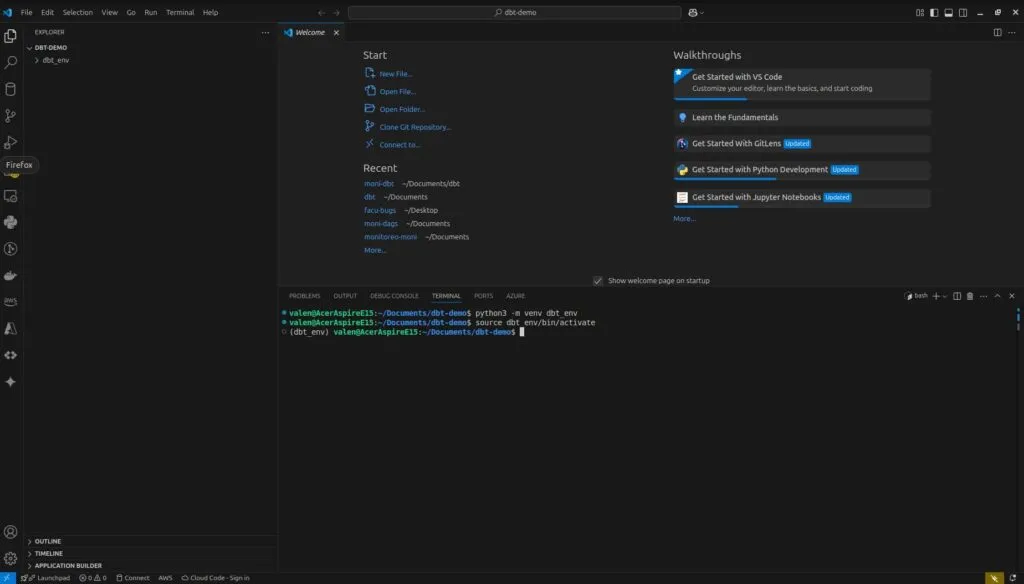
Next, we install DBT Core, and once that’s done, we run the initial setup.
pip install dbt-core
dbt init my_project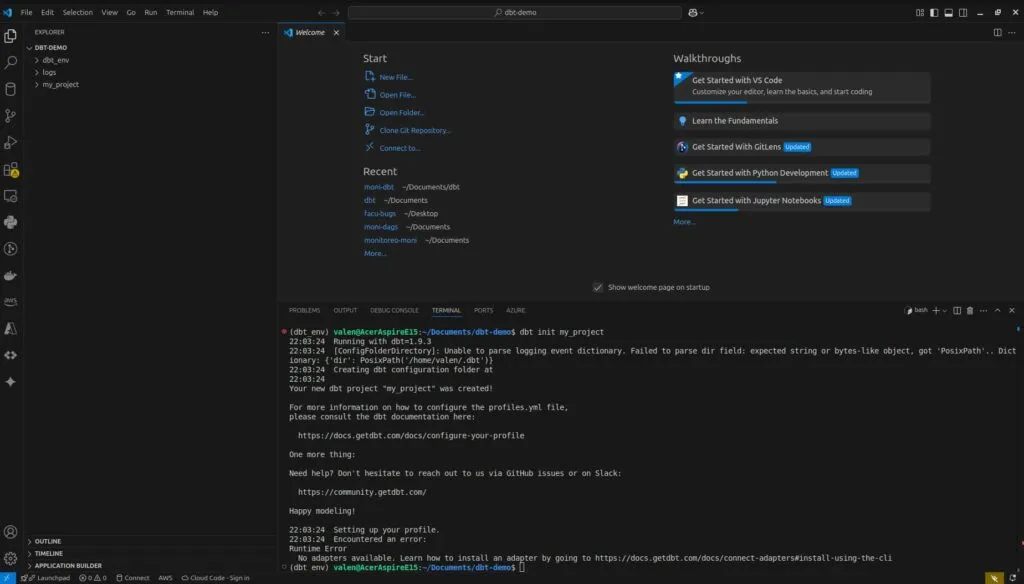
You’ll notice the process ends with a runtime error. That’s because we didn’t install any database engine adapter. Some examples of available adapters are:
- Databricks: pip install dbt-databricks
- PostgreSQL: pip install dbt-postgres
- BigQuery: pip install dbt-bigquery
- Snowflake: pip install dbt-snowflake
- Redshift: pip install dbt-redshift
We’ll install the Postgres adapter for this tutorial. For now, let’s look in detail at what components DBT created in our directory:
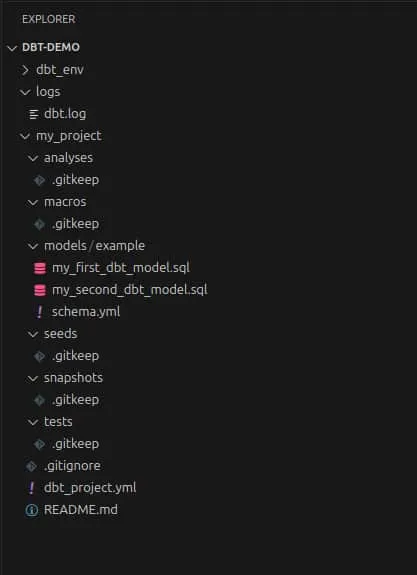
There we can see our virtual environment, a logs folder, and a main folder called my_project (which is what we named this test project when we ran the dbt init my_project command). For now, the analyses, macros, seeds, snapshots, and tests folders are empty except for .gitkeep files. We’ll use them in upcoming posts.
Now we’ll focus on just two components: models and dbt_project.yml.
In dbt_project.yml, DBT already created an initial version of the project file for us to customize according to our needs:
Now let’s create profiles.yml in the project folder and paste the text shown below:
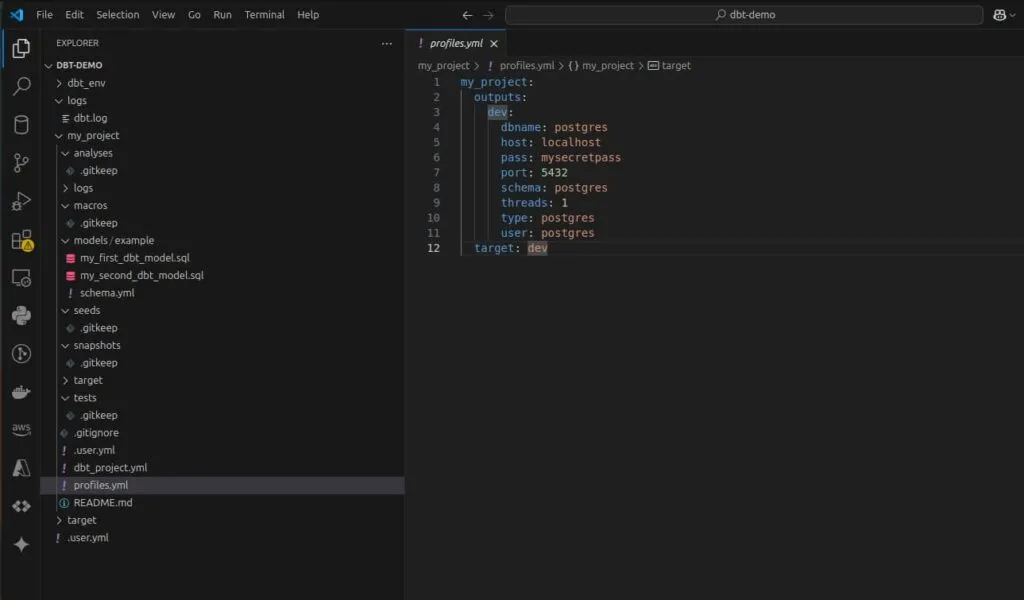
That file should never be committed, which is why it’s normally not placed directly in the project but in a secure directory. But since this is a test tutorial, we’ll leave it here for now and add that file to .gitignore as a best practice to ensure we never push sensitive information to our GitHub repository.
You’ll see that DBT already preconfigured some files that also shouldn’t be included in the repo, so we add profiles.yml to that list.
Next step, we’ll install the Postgres adapter for DBT with the command
pip install dbt-postgresThis will install and update the necessary components to run a Postgres database, which we’ll use more extensively in future tutorials but for now will serve to execute our default models.
With the Postgres adapter installed, let’s run Docker with the following command (purely for convenience; you could use any Postgres instance you want), which corresponds to the configuration we set in our profiles.yml file:
docker run --name dbt_postgres -e POSTGRES_PASSWORD=mysecretpass -p 5432:5432 -d postgresThen we’ll go to the project directory, where we’ll shortly execute our transformations: type cd my_project in the console to navigate to the correct folder. Now everything is ready to run the project.
But first, the other component we’ll look at today is the models folder, which contains an examples subfolder, where we’ll house all the transformations our project will carry out. Inside the examples folder, let’s inspect the two sample models DBT created.
These are two extremely simple processes with no complexity, whose only goal is to show how transformations are written and how models are chained.
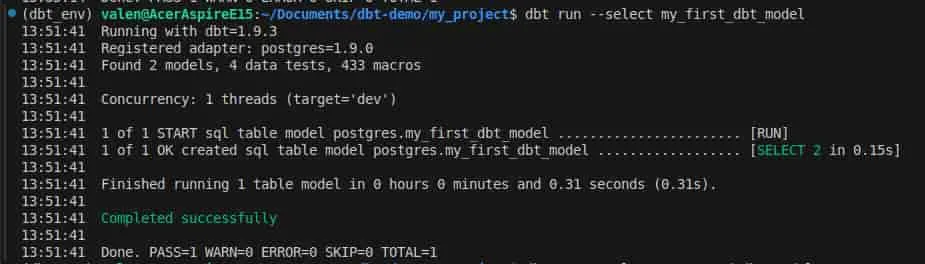
Now, what everyone’s been waiting for: let’s execute the transformations these model files define. Type the following command in the console:
dbt run --select my_first_dbt_modelThis command has two parts:
- dbt run: Executes the DBT models in our project by running the transformations defined in our .sql files.
- –select my_first_dbt_model: Specifies that the only model we want to run is my_first_dbt_model instead of running all models in the project.
You should see this output in the console, indicating the model was executed successfully:
A small variation: we can do the same thing by adding a + at the end of the first command.
dbt run --select my_first_dbt_model+This runs my_first_dbt_model and all downstream models, that is, the ones that depend on it. We can do the same thing in reverse with the other model:
dbt run --select +my_second_dbt_modelThis runs my_second_dbt_model upstream, that is, with the models it depends on.
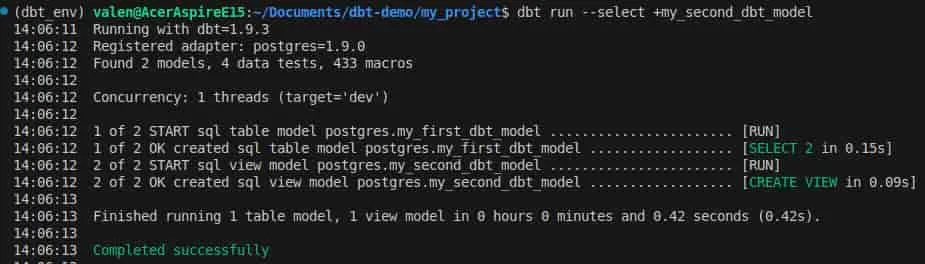
Lastly, let’s run a simple query. We’ll use psql to connect to the Postgres instance we spun up earlier with Docker. Check the user and password from what we configured in profiles.yml and then run the query:
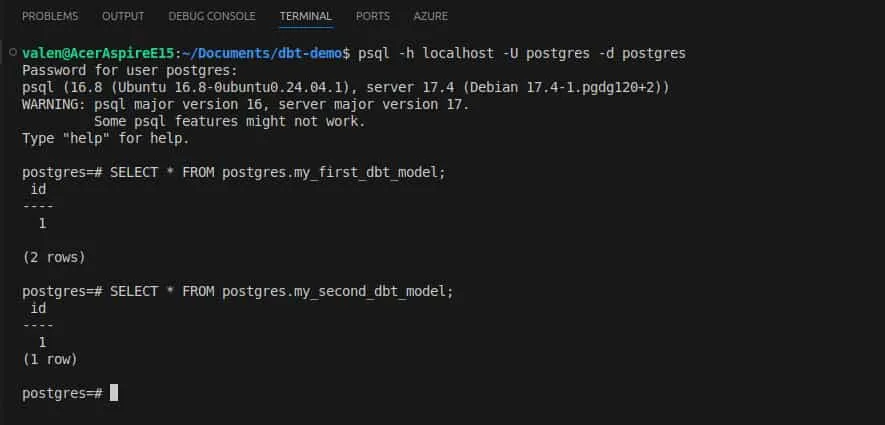
Feel free to play with the sample models DBT provides: add more columns, perform additional transformations, and run queries to see the results. The best way to learn is to get your hands dirty.
Not Goodbye, Just See You Later
With this tutorial we’ve initialized a DBT project from scratch, created the basic configuration files, spun up a Postgres database, and ran our first models to perform transformations. On the theory side, we got familiar with the basic concepts of this framework.
In upcoming posts, we’ll dive deeper into models and their variants, populate a dummy database to test transformations, create a seed as a lookup table, use macros to abstract redundant code, and generate automatic documentation.
One of the things I enjoy most about working at Deployr is that we share what we know. Every project, client, and challenge is a learning experience for us, and democratizing knowledge matters when you belong to a community like the one data practitioners are part of. See you in the next edition.


