
Coding with type hints: a simple practice that optimizes your business

In software development, small details make big differences. Adopting best practices like type hints in Python might seem like a minor change, but it has a direct impact on code quality, team efficiency, and business scalability.
Fewer bugs, better readability, smoother collaboration between developers: all of this translates into less wasted time, less technical debt, and more value delivered.
In this post we’ll walk you through a very useful tool for catching errors in your code, preventing bugs, and making sure whoever reads your code after you doesn’t pull their hair out. Let’s go!
Dynamically typed, dynamically confused
Python is a dynamically typed language, meaning variables can change their data type during script execution, unlike statically typed languages where types are declared before compilation. This makes Python more flexible and opens up more possibilities, but it also makes it more prone to certain errors.
What do we mean? Here’s a function called multi_call defined in a file called multi.py.
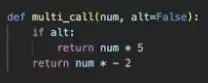
It’s a perfectly normal function: it takes two arguments, num and alt, and alt has a default value of False. If alt is True, the function returns num multiplied by 5. If we leave alt at its default, it returns num multiplied by -2.
When we define a function argument, if we don’t specify the data type, Python’s interpreter will treat it as “Any”, meaning it accepts any data type as input.
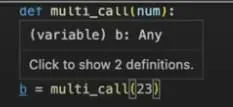
In this function, since we set a boolean default value for the alt argument, Python expects a value of the same type, so it would accept True or False but not 1, 3.7, or “true”. But what if we don’t want to set default values? How can we make our code more readable and less prone to errors and bugs?
There are some tools and best practices that help us define and explicitly declare the data type assigned to each variable as an additional layer of control. One of them is the type hint.
Here’s a hint…
When we specify that the default value of alt is False, Python’s interpreter determines it’s a boolean argument. alt=False is equivalent to writing alt: bool = False, and with this second syntax, what we’re saying is “the argument alt takes boolean values and defaults to False.” In modern Python versions (3.10+), we can also use a more concise syntax with the | operator for optional types: for example, alt: bool | None if we also accept null values.
This is useful for eliminating ambiguity and preventing runtime errors, and it’s something we can do explicitly with all parameters a given function takes. Starting with Python 3.9, we can even use simpler native syntax like list[int] or dict[str, float], without needing to import List or Dict from typing.
Let’s look at the updated multi_call() function with more information:
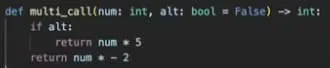
Here, it’s clear that the developer who wrote this function declared that the num argument should take integer values, a logical definition given that the value is then multiplied by 5 or -2 depending on the boolean condition set by alt. But we also added -> int outside the parentheses, which specifies the data type of the function’s output.
These little “helpers” we’re adding to our function are known as “type hints,” and they’re an excellent tool for keeping our code clean, readable, and bug-free. They were introduced in PEP 484 (Python Enhancement Proposal, a document that proposes improvements or describes new features or processes for the Python community) and have become standard practice across all kinds of Python development.
One of the advantages is being able to hover over a variable before assignment and have the interpreter tell us in advance what type the resulting variable will be. In a simple function like the one we’re analyzing this might seem obvious, but in more complex ones it can save a lot of time analyzing code and data types.
Now, if we call multicall and pass 7.2 for the _num argument, that is, a float instead of an int, the function will still execute. I can already hear your frustration. Why, if we specified the type with a type hint? Because hints don’t enforce the data type a function takes; they make it easier for the user to use correctly. If we wanted to halt execution when inputs don’t match our hints, we’d need to extend our code with syntax like this:
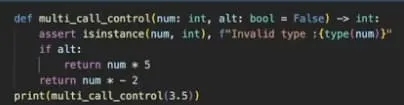
In this modified function, it’s the assert statement that validates the data type.
So now we know that type hints are a best practice for code readability and debugging. Time to introduce a tool that will make life even easier for you and everyone who has to work with your scripts.
No pain, no gain
Before moving on with the rest of this post, I’d like to take a brief detour to tell you about linters, a very useful (and in many cases crucial) component for ensuring readability, quality, and adherence to coding standards and best practices.
A linter (the name comes from a Unix utility used to find errors in C code) is a tool we can add to our IDE to assist development by detecting potential errors, bugs, style inconsistencies, and other issues. There are linters of different types for finding all kinds of errors; it’s up to each developer to find the one that best fits their use case.
Let’s look at a library specifically designed to automate type hint checking: MyPy. The idea behind this linter is that it brings elements of static typing to Python by testing the functions defined in our code, specifically by checking that the data types we declared as type hints match the variables used downstream. This lets us ensure consistent typing of variables and function outputs without even running the scripts.
Installation is a simple !pip install, like almost any standard library.
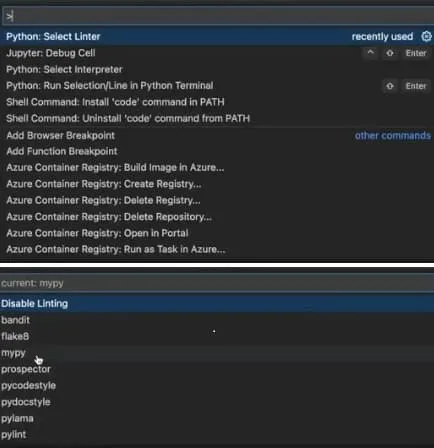
It’s important to note that MyPy doesn’t work with Jupyter Notebooks (a popular choice among data scientists for prototyping scripts), but it does work for analyzing full files.
Below we see the classes.py example:
- We have an init that takes three arguments: a, b, and c, with types int, str, and float respectively.
- We’ve set a as 1, b as 1, and c as “asdad” (also known as “face on keyboard”).
- The data type we declared for parameter a is correct; 1 is an int. But b and c were assigned data types that don’t match what we specified as type hints. If you look closely, when MyPy is selected as the linter, the assignment of A highlights parameters b and c with a small red underline indicating an error.
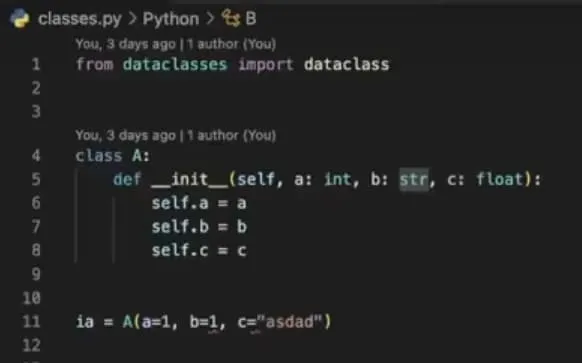
Remember once again: passing parameters to functions with data types different from what we indicated as type hints doesn’t necessarily mean execution will fail. When we correct the data types so they match our hints, the red underlines disappear.
Now let’s see how we can analyze the file containing our class using MyPy.

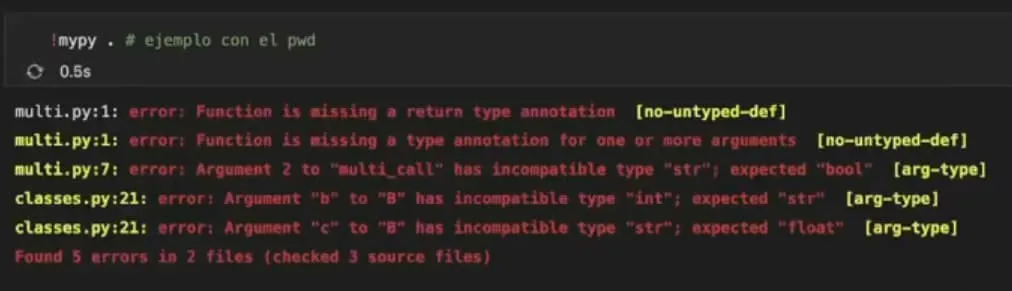
If we call MyPy on the multi.py file containing multi_call (which, by the way, is in the same directory as the notebook we’re running) using the !mypy command, the library immediately detects the inconsistencies we’ve been discussing.
Another option is to call !mypy directly, which will analyze all .py files in the current directory.
But I want more…
That wraps up this first post. We saw how using type hints and tools like MyPy not only improves code quality but also impacts team efficiency, reduces avoidable errors, and makes it easier to maintain growing projects. In contexts where software is core to the business, writing clearer, more readable, and better-controlled code isn’t just a technical matter. It’s a strategic decision.
What if, beyond suggesting types, we could validate them automatically at runtime? There’s a library built exactly for that… but we’ll cover that in the next installment.


